EN
EN DE
DE CH
CH AT
AT
AI Meeting Recorder
Enable recording on a scheduled online interview. The recorder joins one minute before the start.
The Number One HR Solution on Salesforce
Interview Intelligence
The flair AI meeting recorder joins your online interviews and saves a summary and the full transcript on the candidate. AI Scores and AI job descriptions speed up the rest of the hiring process.
From the first job ad to the interview write-up, flair AI takes on the repetitive work so your team can spend its time with candidates.
Enable recording on a scheduled online interview. The recorder joins one minute before the start.

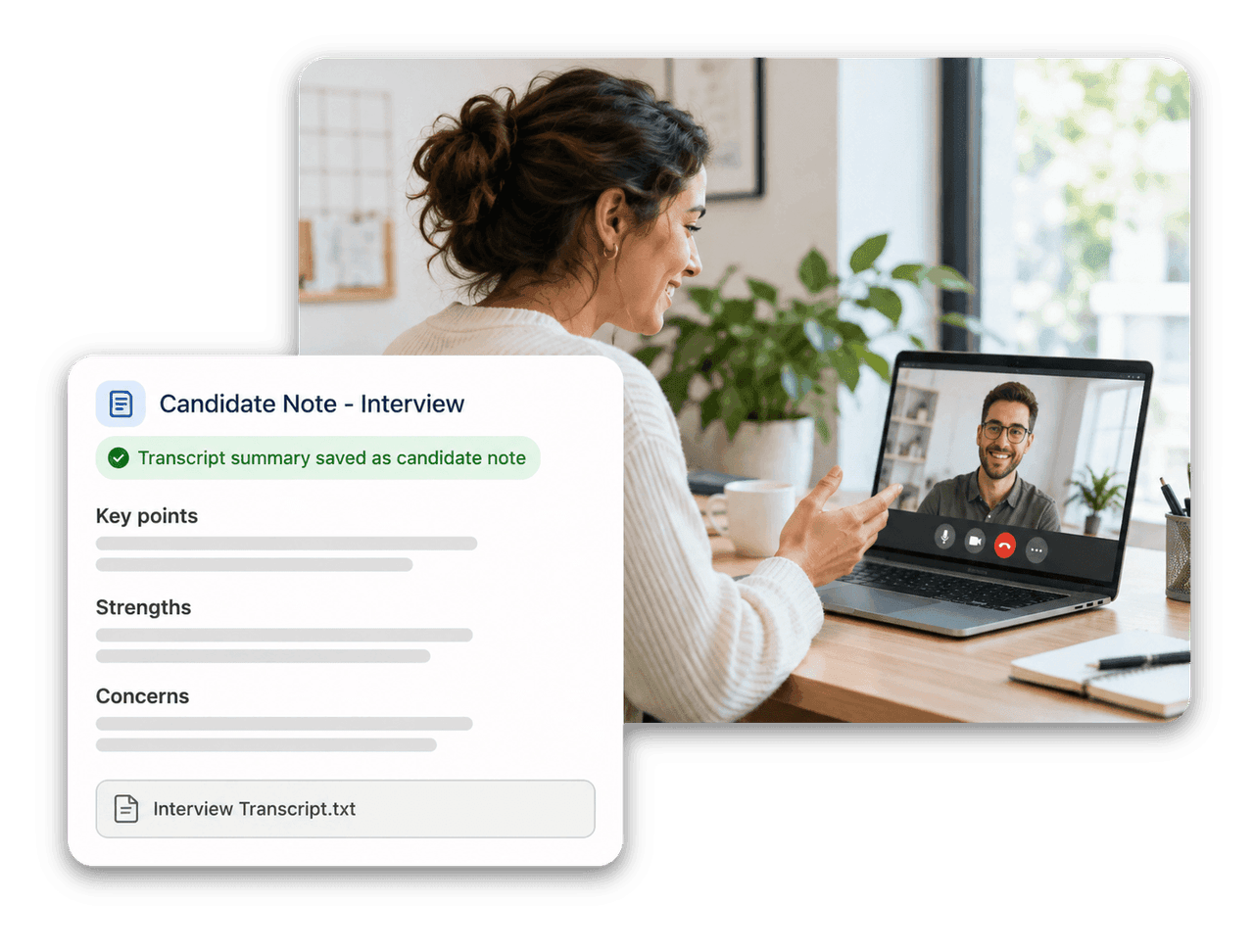
flair saves an AI summary as a Candidate Note and attaches the full transcript as a text file.

Every new applicant gets a score from 0 to 100 that compares CV and cover letter with the job requirements.

Mark application fields or questions as knock-out criteria. Applicants who fail them move to Rejected automatically.
flair AI Meeting Recorder
Open a scheduled online interview on the candidate record and select Enable AI meeting recording. The recorder joins one minute before the start, and a status badge shows its progress without reloading the page. When processing finishes, flair creates a Candidate Note for the candidate's current funnel stage.

Candidate Screening
With flair AI enabled, each new applicant from your career portal receives an AI Score automatically. The score ranges from 0 to 100: the higher the value, the closer the match between the job requirements, the CV and the cover letter.

AI Job Descriptions
Enter a prompt for the role in the Create Job wizard and generate a job description in place. The draft can include a role summary, responsibilities, candidate requirements and benefits, and you review and edit it before you save the job.




flair saves the summary as a Candidate Note for the candidate's current funnel stage. It covers the interview overview, the key points discussed, the candidate's strengths, any concerns and notable quotes, and identifies itself as generated by the flair AI meeting recorder. The full transcript is attached as a text file named Interview Transcript.
Online interviews scheduled in flair with a meeting URL, in the Scheduled or Candidate Invited state. The recorder joins one minute before the scheduled start. If you reschedule the interview, flair books a new recorder for the new time; if you cancel it, the recorder is canceled automatically.
Each new applicant receives an AI Score from 0 to 100 once flair AI is enabled. A higher value indicates a closer match between the job requirements, the CV and the cover letter. Use it for initial screening only: it does not replace your review of the candidate's materials or human judgment in a hiring decision.
Mark any application field or custom question as a knock-out criterion with a condition, such as an expected salary above your range or no work permit. Applicants who fail it move to Rejected roughly ten minutes after applying. You configure criteria per career portal or per job, and nothing changes until you set them.
The AI Score and AI job descriptions require the paid flair AI feature, which an HR Admin enables under HR Admin, Integrations. Interview recording additionally needs the Recruiting Communication integration for interview scheduling. flair AI features are currently in beta.
Ready to see how your organization will thrive with flair? Get in touch with us to discuss your needs and see how flair can help you boost your HR efficiency.

Take a tour of flair tailored to your top priorities
We'll support you throughout the process